Multiple Clipping Path Service From $0.50 -Delivered in 24 Hours
Two or more Photoshop sub-paths inside one image, traced by hand with the Photoshop Pen Tool. Keep your apparel, jewelry, and product shots completely editable down to every color zone, every fabric layer, and every metal facet.
Turnaround time
Years in prodcution
Multi-path by editor
No credit card required. NDA on request. Secure file transfers via Dropbox, WeTransfer, or FTP.
Trusted By Production Teams At






- 100% hand-drawn in Photoshop
- NDA available before trial
- TIFF · EPS · PSD · JPG output
- Unlimited revisions
- Bulk discount from 500 images
What is a Multiple Clipping Path service and why you need this?
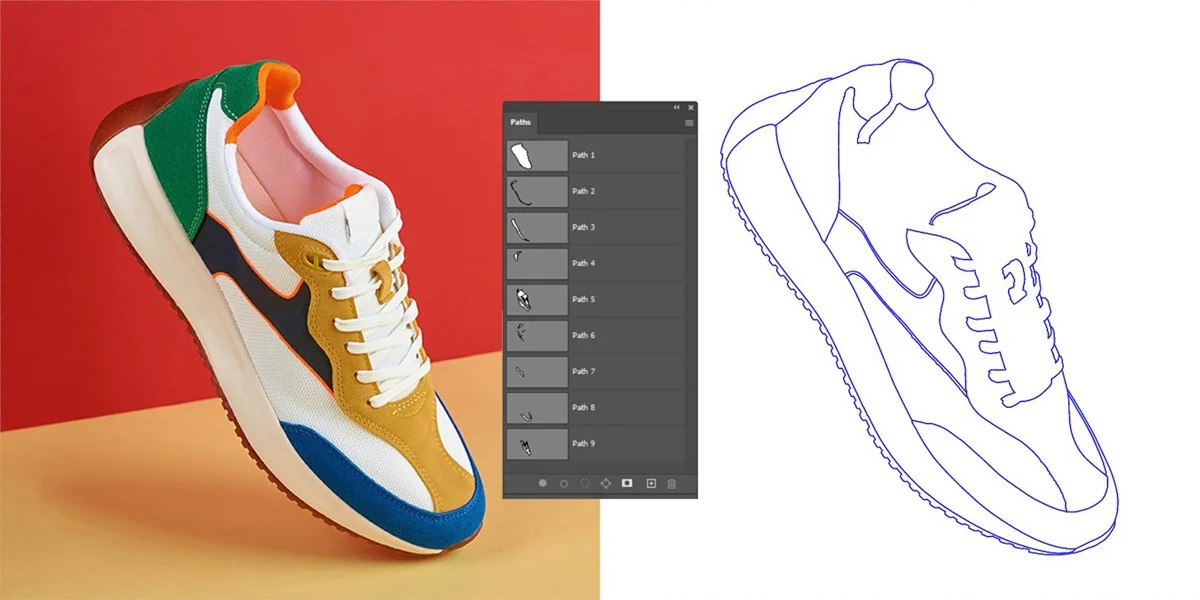
A multiple clipping path service (also known as a multi-clipping path) consists of two or more named, saved vector sub-paths drawn inside a single image file. While a basic clipping path service provides a single outline around a product image for standard background removal, complex image clipping transforms a flat file into a modular editing unit.
When you create a clipping path for multiple objects or parts within a single shot, this multi clipping process isolates distinct elements—such as a collar, a sleeve, a zipper, or a gemstone. This allows an editor to select and clip specific zones independently. This exact technical distinction is why clipping path is used at production scale over automated software.
Work path vs saved path vs vector mask
- Work Path: Temporary Adobe Photoshop overwrites it the moment a new path is drawn. It is highly unsafe for professional post-production where you need consistent image quality.
- Saved Path: Permanent, named, and stored securely in the Paths panel. This hand-drawn path embeds directly into your master files to guarantee accurate results.
- Vector Mask: Attached to a specific layer for visibility control. While useful, it is not a substitute for named, batch-targetable sub-paths that survive export.
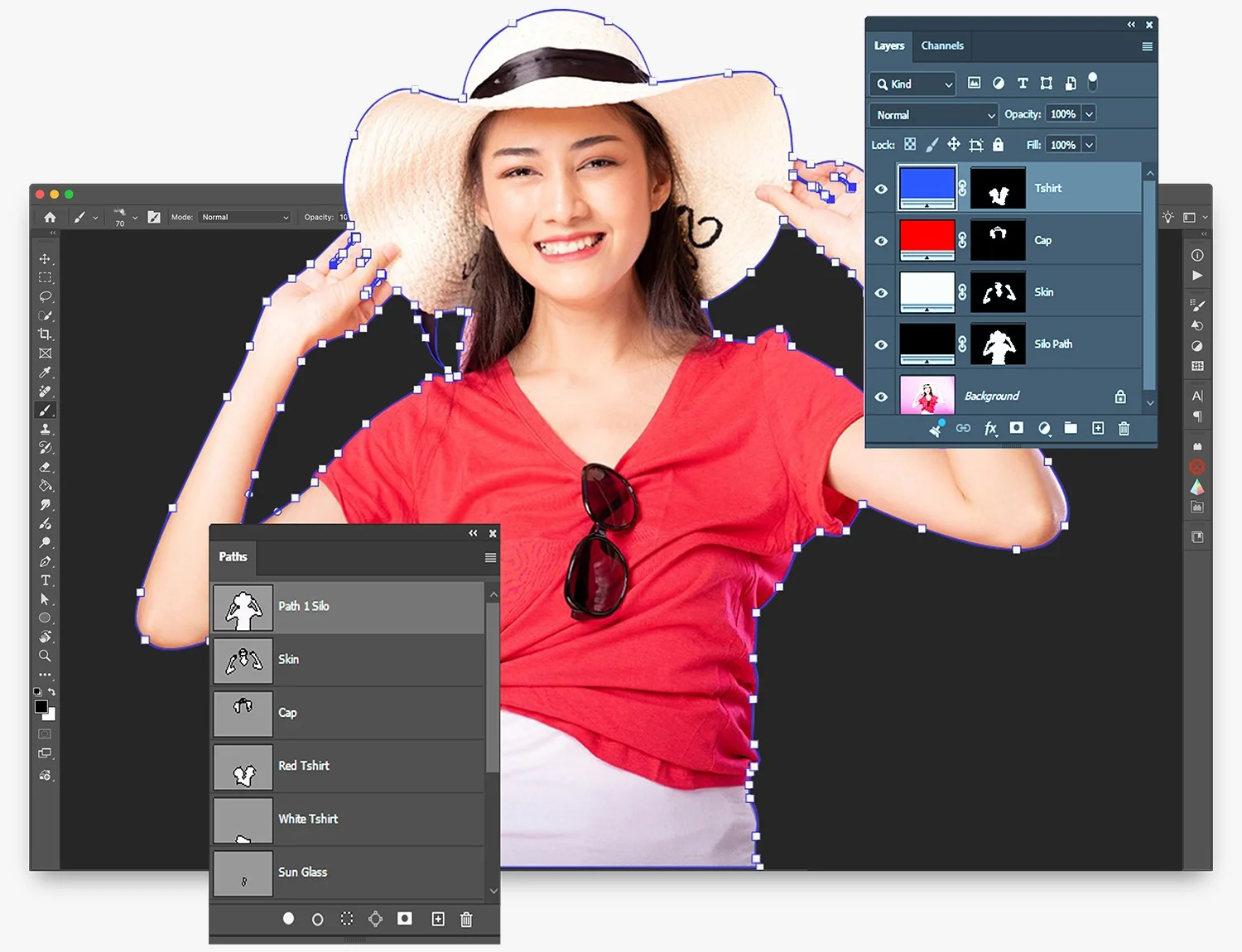
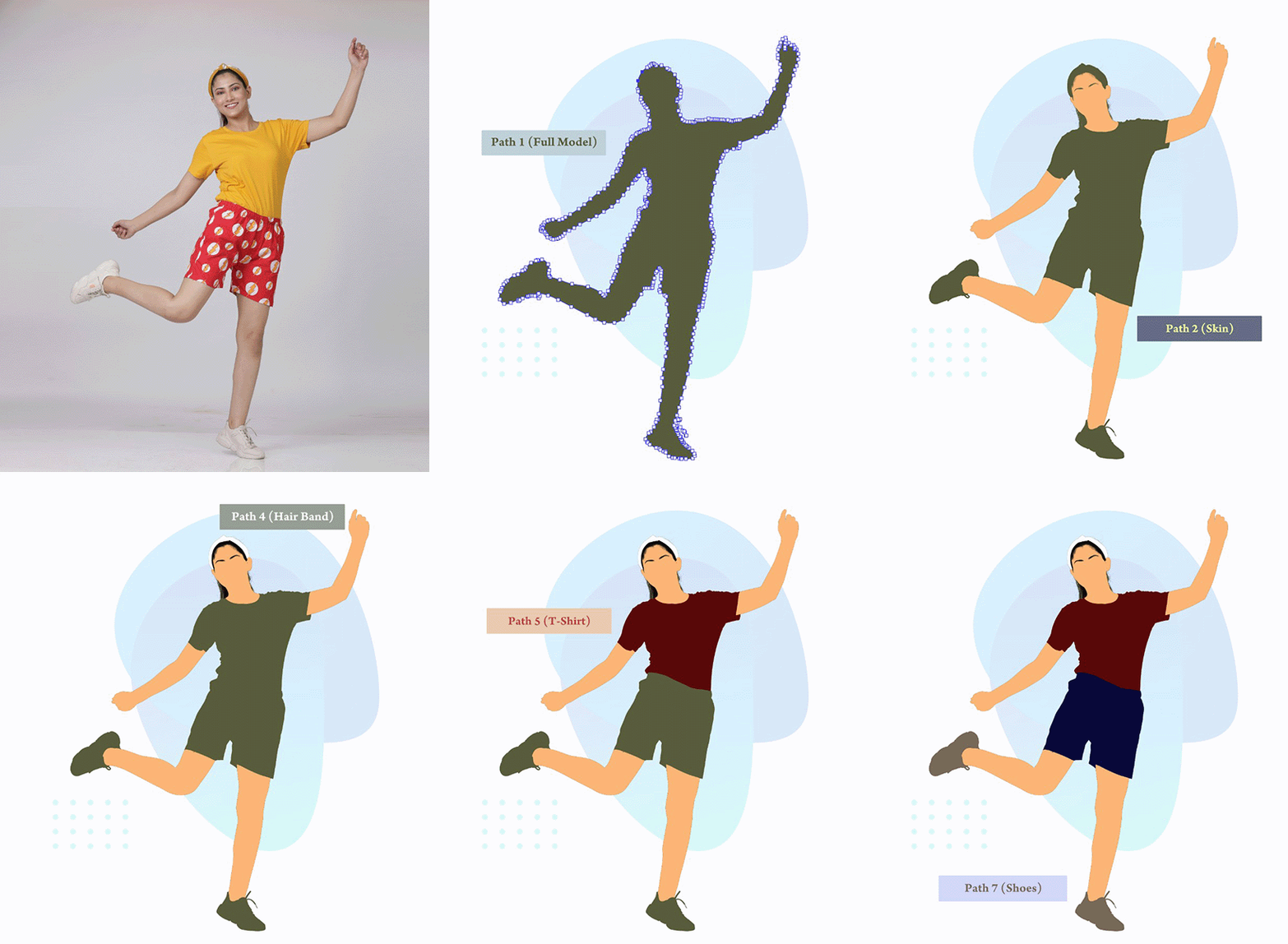
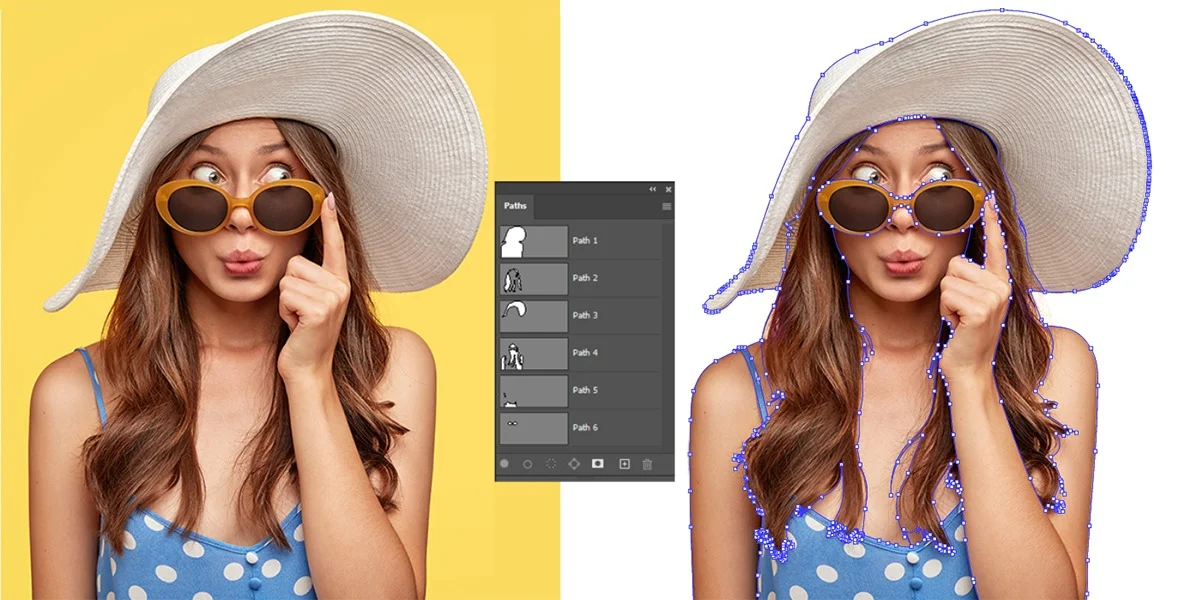
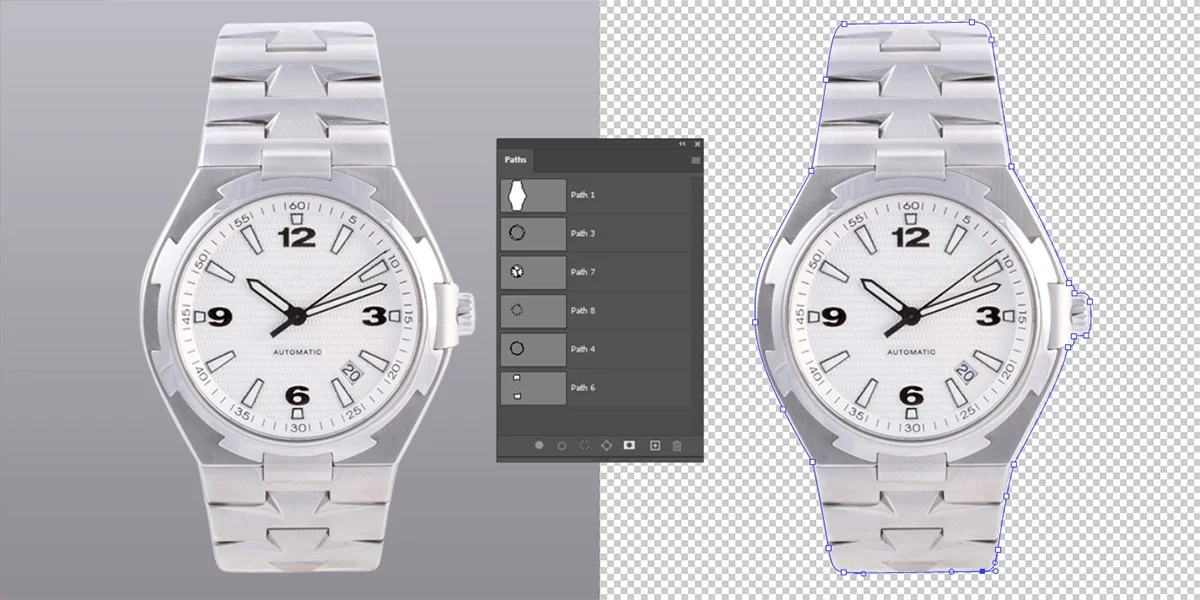
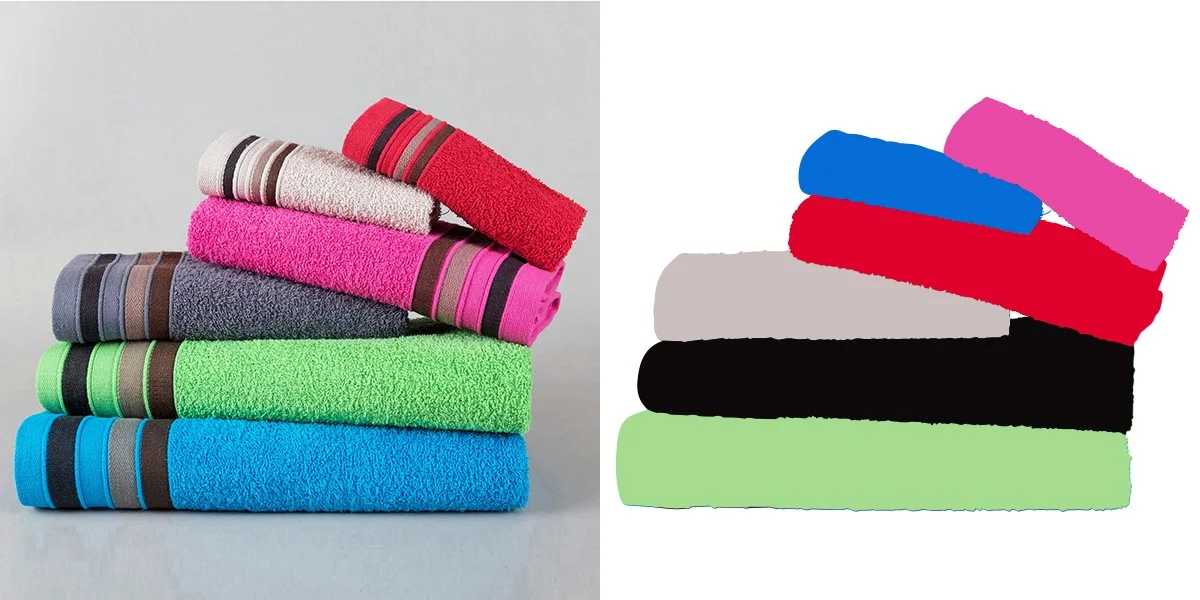
See our visual multi clipping path Examples
Each slide pairs the original shot with its hand-traced Photoshop sub-paths, showing exactly how we isolate every editable zone inside a single PSD.
Watch our team edit: 60 seconds inside the pen tool
Senior editor cuts a ghost-mannequin sub-path on a real client shirt. No edits. No cuts. Real time.
Recorded on a real client batch — apparel ghost-mannequin with 3 sub-paths (outer body, neck opening, inner fabric).
Anchor-point Benchmarks for complex path projects
Pulled directly from our internal job-tracker so you know what to budget before you brief our image editing floor.
| Image Type | Sub-Paths | Avg Anchor Points | Edit Time | Best Price Tier |
|---|---|---|---|---|
| Plain product on white (basic) | 1 | 15-20 | 3–5 min | Basic |
| Separation paths | 2-5 | 40-60 | 15-30 min | Standard |
| Clipping Paths | 5-15 | 100-150 | 60 min+ | Complex |
| Jewelry Retouching | 10-15 | 150-200 | 60 min+ | Complex |
| Model Photography | 10-15 | 200-250 | 60 min+ | Complex |
Source: Internal data. We optimize every batch of product photography using advanced photo retouching to enhance lines while keeping anchor points clean.
Human Precision: Expert clipping with no AI black box
The lead editor who sets path tolerance and QC standards for our editing services isn’t an automated script—it’s an expert who guides our in-house team of graphic designers to deliver a truly professional look.

Sunil Barman
Senior Path Editor · 11 years in production
Sunil has manually traced 86,000+ multi-paths across apparel, jewelry, and real estate imagery. He defines the anchor-density guidelines that ensure high-quality results across our entire floor.
“Most people think a Multiple Clipping Path Service is just ‘more paths in one file.’ It’s not. It’s a discipline. Every sub-path built using the photoshop pen tool needs to seamlessly survive an automated batch Action three months from now without breaking. That’s the detail automated algorithms miss.”
Our multi-path services workflows
Every production run fits into one of these seven specialized photo clipping path services categories:
Handmade Clipping Path
Perfect for clean, single-product photos that require high-quality background removal from an image at an affordable rate.
- 2-4 Sub Paths
- Basic Tier
Complex Clipping Path
Designed for image clipping involving multiple overlapping objects, small holes, intricate details, or complex curves.
- 10-15 Sub Paths
- Complex Tier

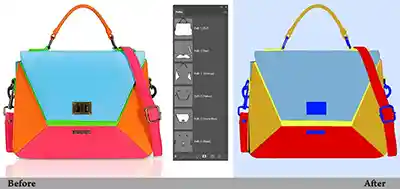
Color Correction & Separation Path
Isolates distinct fabric layers and garment zones so your team can easily run a color correction workflow, enhance tones, or swap colors.
- 5-8 Sub Paths
- Standard Tier
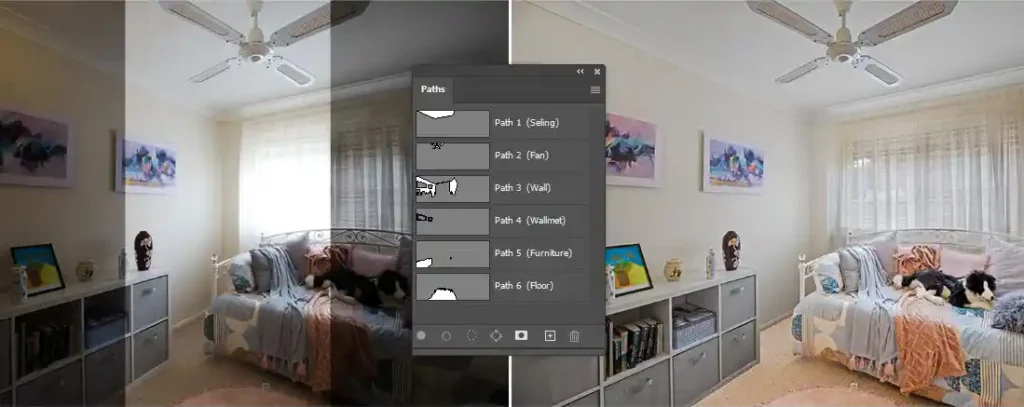
Real Estate Property Path Editing
Precision-drawn paths for indoor and outdoor property photos. Isolate window glass, horizons, and trim to correct lighting, perform sky replacements, and fix exposures.
- 5-10 Sub Paths
- Standard Tier
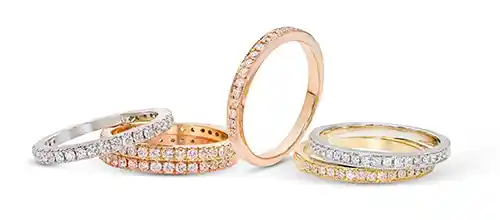
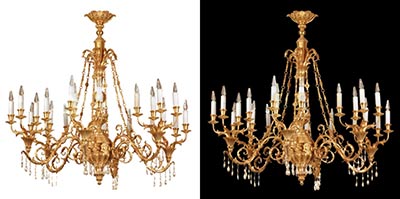
Jewelry Retouching Paths
Meticulous pathing around delicate facets, gemstones, and prongs to retouch metallic surfaces without sacrificing sharp edges.
- 1-5 Sub Paths
- Basic Tier
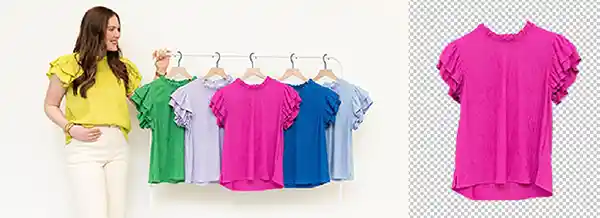
Product Separation Service:
Isolates individual items out of crowded group shots. Crucial for building clean e-commerce catalogs and advertising layouts.
- 1-5 Sub Paths
- Basic Tier
When a standard clipping path service is the wrong choice
We pride ourselves on honest, high-quality results. There are three cases where a standard multiple clipping path isn’t the right choice:
When Hair, Fur, or Lace is Involved
The sharp vector edges of a pen tool cannot cleanly capture soft, semi-transparent details. For this, image masking or hair masking (using alpha channels and advanced photo masking) is the ideal workflow, with paths acting purely as a supporting layer.
When Dealing with Glass or Reflective Products
Transparency requires a dedicated transparency map alongside a silhouette path. A standard path alone strips away natural see-through textures during background swaps.
When Fast AI Auto-Masking Wins
If you have a single, non-commercial product shot on plain white backgrounds and don’t need consistent edges, free AI software or a simple magic wand tool is fast and efficient. However, our March 2026 test showed a 40% failure rate for automated cutout tools on complex details like fabric folds, shadows, and prongs.
Human precision over AI
Based on our internal March 2026 test of 240 production images.
| Factor | Hand-drawn (Pen Tool) | AI auto-mask |
|---|---|---|
| Sub-paths inside one file | Unlimited, named, editable | One mask per image, not editable |
| Edge precision (hair, lace) | 0.5 px tolerance + alpha layer | 2–4 px ragged |
| InDesign / EPS workflow | Vector path tags survive export | No embedded vector path tag |
| Color swap on garment zones | Precision isolation per sub-path | Global changes or inaccurate selections |
| Bulk consistency 200+ images | Locked tolerance presets, strict QC | Drifts and shifts significantly per image |
| Batch Action targeting | Named saved paths; 100% indexable | No structured, repeatable output |
| True cost at scale | $0.99/img (Fixed, predictable) | ~$0.10/img (But 40% required manual rework) |
High-Volume Ecommerce image editing workflow we support
Six high-volume production environments where a modular source file saves time and budget:
Jewelry & Watches
Easily recolor gold from yellow to rose without affecting diamond settings. Isolate and enhance every single facet and shadow seamlessly.
Real Estate Workflow
Perform complex image manipulation like sky replacements and window exposure balancing using a single master multi-path file.
Apparel & Fashion
Shoot a garment once and sell it in multiple colorways. Isolating bodies, sleeves, and collars slashes your studio reshoot costs.
Commercial Photographers
Give your commercial client base perfect files that plug straight into their design assets. Every busy photographer can offload their tracking lines to specialized service providers.
E-commerce & Retail Teams
Optimize every ecommerce image to look identical across category pages, driving consumer trust and increasing digital storefront conversion rates.
Pre-Press & Design Agencies
Scale your high-volume print or digital publishing pipelines with clean vector paths that refine layout edges without manual correction.
How a job moves through our floor
Wherever one image needs more than one decision, multi-path saves the reshoot.
Upload your files
Drop a sample or full batch via Dropbox, WeTransfer, or FTP. NDA before upload, on request.
We trace + QC
Lead editor opens image one, locks path tolerance and feathering, traces sub-paths. QC sample at images 25, 100, 250.
Preview + Fixing
You get a 5-image preview before the full batch ships. Unlimited revisions, no extra charge.
Delivery on time
TIFF, EPS, PSD, or JPG with embedded saved path. Direct to your DAM, S3, or shared folder.
In-House editors vs outsourcing
Wherever one image needs more than one decision, multi-path saves the reshoot.
Send 3 images now, we are ready!
Send your trial job, we will get back to you within 20 minutes with a pixel-perfect edits.
Transparent pricing for multi clipping path services
We offer flexible and transparent pricing according to your job.
1-100+ images in 24 hours
- Basic product on white Background
- 24-hours turnaround
- Handmade clipping path
- 100% Pixel perfect result
- Accurate Anchor Point
Standard
100-500+ images, 3-5 sub-path
- Model photography
- 15-hours turnaround
- Handmade photoshop clipping path
- 100% Pixel perfect result
- Accurate Anchor Point
Request your quote
- Complex product
- Super fast turnaround
- Handmade photoshop clipping path
- 100% Pixel perfect result
- Accurate Anchor Point
Why clients choose us?
Six reasons that show up in client retention data, not just on a sales page.
5 hours rush delivery
Three production shifts. Files received 24 hours shift.
Pixel perfect result
Locked path tolerance preset across the whole batch. No drift between image one and image 500.
Weekly or monthy invoice
Three tiers. Public rates. No "varies by complexity" surprises after you upload.
Bulk discount
$0.99 floor on basic, $1.50 on standard, after the first 500 images per month.
24/7 lead-editor coverage
Skype, email, and a private Slack channel for accounts over 2,000 images per month.
Photoshop clipping path
Pen Tool, anchor by anchor. No AI auto-mask. No batch-detect-and-pray.
What our clients say


Frequently asked questions
See the plain answers to what you’ll ask before sending the job.
How do I get started?
No need any account signup. Request a quote for your trial job and we’ll get back to you within 30 minutes.
What is the pricing structure for different complexity levels?
Our price start from $0.50 as a basic tier, $1.00 as Standard with a custom pricing plan.
What file format do you accept?
You can send what you have RAW footage. We are flexible for all kinds of file formats.
Do you offer revision or correction process?
Yes, we are maintaining our standard reputation till you’re satisfied without any extra cost.
Can I send a test job?
Yes. We offer super-fast customer service to do any best deal in 20 minutes.
Are my files and brand assets kept confidential?
Yes, of course. This is the main business focus we have followed since 2010.