Each channel sets its own online store product image size: Amazon wants a pure white main image, Etsy shows a small thumbnail first, and Shopify crops to a square. For jewelry, one well-shot master file can serve all of them, if it is built at 2,000 px with the stone and the band sharp and the background at 255. The rest is a crop per channel.
Quick answer:
- Build one master at 2,000 px on the longest side, square, with the piece at 85% of the frame.
- Export a copy per channel: Amazon main image pure white, Shopify square, Etsy and Instagram at their own crops.
- Keep the background at RGB 255 for marketplaces, and check it in the Info panel, not by eye.
- Jewelry breaks three rules that work for clothing: the background, the fill and the zoom.
One master file, several crops
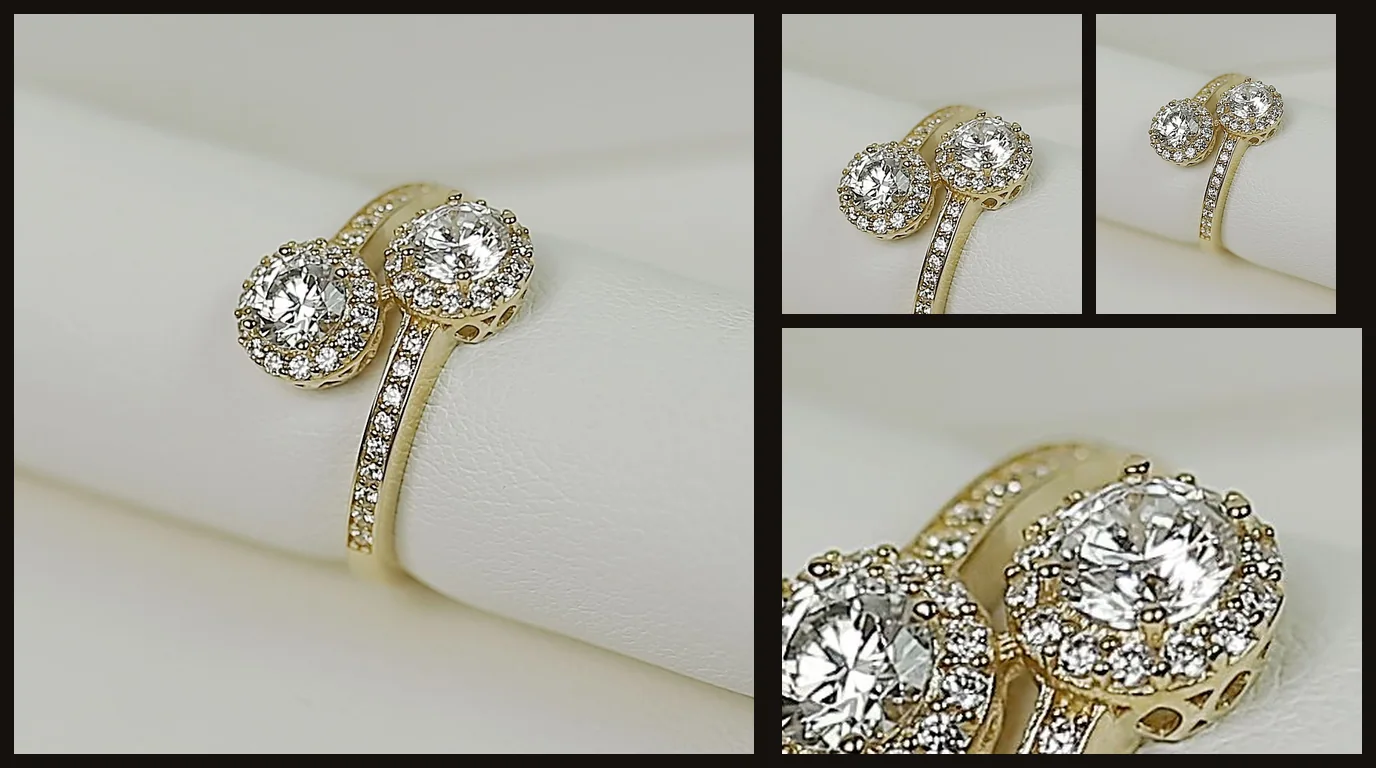
Shoot once and finish the master at 2,000 px. Every channel’s file is then a crop or an export of that master, so the lighting, the background and the stone match across the shop. The table gives the crop each channel expects. The detail for each one is in its own cluster.
| Channel | Crop the buyer sees first | What to ship | Full rules |
|---|---|---|---|
| Amazon | Square main image, pure white, piece at 85% | 2,000 px square, RGB 255 background | M1, Amazon image requirements for jewelry |
| Etsy | A thumbnail in search, where the piece is small | About 2,000 px on the shortest side, a clean background | M2, Etsy listing photo size |
| Shopify | Square product image, cropped by the theme | 2,048 × 2,048 px square, compressed by the theme | M3, Shopify product image size |
| eBay | Gallery image and zoom | Covered in the backlog cluster | M4, eBay product image size (backlog) |
| Instagram and your own site | 4:5 feed post, or the theme’s banner crop | The same master, cropped per placement | M5, backlog |
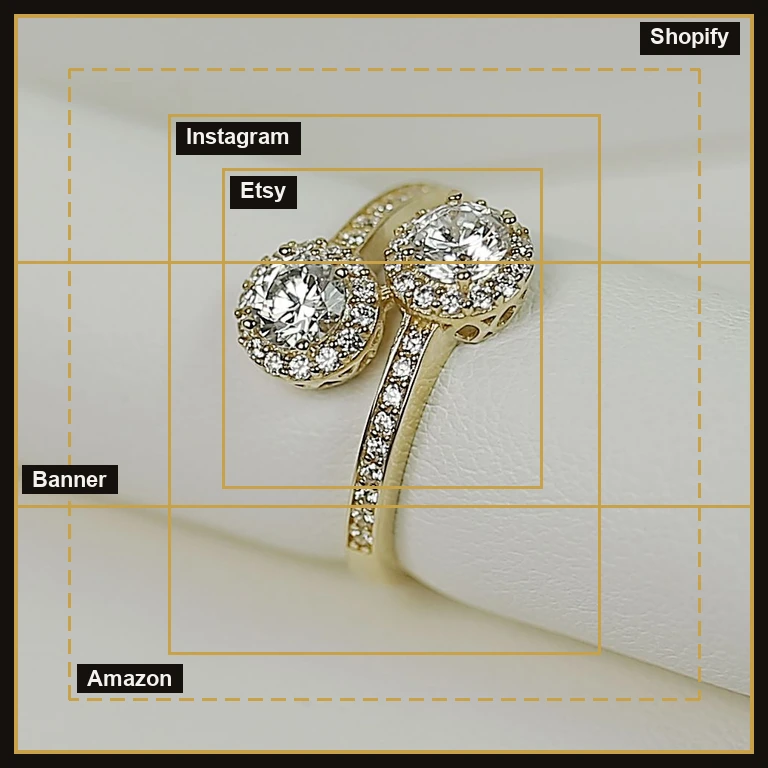
A fourth channel, the search-results thumbnail, decides the click before any image is opened. Etsy’s grid shows the first photo at small size, so the piece has to read in a few pixels. So fill the frame, and leave the props out.
The master is the file you keep. It holds the full resolution, the finished background and every fix, and it never goes to a channel. Each export is a copy cut from it, so a correction made once in the master reaches every channel the next time it is exported. Keep the master in a product folder with its layered file, named by product and date, so a re-export months later still matches the original.
Build the master square, because every crop starts from a square. Frame the piece at about 85% of the square with even margin on all four sides. That margin gives each channel room to crop without touching the stone or the band. A piece framed tight against one edge can only be exported for the channel that matches that edge, which is the mistake this approach avoids.
Where the channels agree, and where jewelry breaks the rules
Most of the rules agree. Every channel wants a clean background, a sharp main image, and no text laid over the product. Where they differ, the differences are about crops and file size, and a master file handles them.
Jewelry breaks three rules that work for clothing. The first is the background. A white sweep that is gray at the edges fails a marketplace check, and pushing it to 255 can flatten polished metal. The second is fill. A 4 mm band at 85% of the frame is small, so a buyer on a phone sees very little detail. The third is zoom. Stones have to sharpen at 100% and hold at the thumbnail, which is why the stone is the part of the file that cannot be faked.
The background clash hurts sales most. A buyer on a phone judges the piece in a few seconds, from the stone’s brightness and the band’s shape. If the background drifts to gray, the piece looks dull even when the metal is right. If the piece is small in the frame, the buyer cannot see the setting and assumes there is less to it. Both problems start in the file.
Jewelry also needs more than one crop. A ring shows its face in one frame, its height in another and its band in a third. A chain needs a full-length shot, and a pendant needs a close one. Clothing can often be shown in a single front view. For jewelry, the set of frames is part of the product, and each channel’s rules decide how many frames the set can have and which one comes first.
Editing fixes some of these clashes and not others. A background can be lifted to white in the file, and a stone can be sharpened, but a stone shot out of focus or a band lit flat cannot be rescued into a sharp one. The capture side is in our jewelry photography guide, the part of the topic this pillar links to from each section.
Reading a channel’s spec without being misled
Channel specs change, and most sizing advice online was written when the rule was different. Before you build a master, read the channel’s own current page and check the date it was last updated. Each cluster page carries the detail for its own channel, so the numbers here stay short.
- Start with the channel’s own help or seller page, not a blog summary of it.
- Note which rule is the strictest, and build the master to it. Every other channel is a crop from that master.
- Read both the general guide and any category page. For jewelry, the category page can override the general one.
- Write the date on the spec sheet. A sheet with no date is a claim you cannot check.
- Test the first upload on a live listing before a whole catalog goes up.
Resizing apps and image converters can produce a file that fits a size limit and still fails a rule about background or fill. Check the background value and the fill against the spec, whatever the file size says.
What a channel does to your file after upload
After upload, each channel processes the image again. A marketplace may resize, recompress or crop a file for display, and a storefront theme may do the same. Two things follow. First, a file much larger than the size the channel displays is compressed harder, so detail that was sharp in the master can soften in the live listing. Second, the crop the buyer sees is not always the crop you exported.
Judge the image on the live listing, where the channel has already processed it. Open the listing as a buyer would, at the size they would see it, and compare it with the master. If the live image has lost the stone’s sparkle or the band’s edge, go back to the master, adjust the export, and upload again. Keep the master for the next correction, so the fix is made once and repeated cleanly.
Keep a short record for each product: the master’s file name, the channels it was exported for, and the date each export went live. When a channel changes its rule, the record shows which listings need a new export, and only those listings need updating.
Amazon: the strictest main image
Amazon sets the tightest main image of any channel: pure white, 85% fill, no model on the main image, and a file that stays within a pixel range. The jewelry category adds one exception for close-ups and tightens the ceiling. Every number and the step order are in Amazon image requirements for jewelry sellers.
If you sell on Amazon and on your own shop, make the Amazon file first. It is the strictest, so a master that passes Amazon’s check also works for most other channels after a crop.
The main image is the one image every buyer sees on an Amazon listing, in search results and on the product page. Its fill and its background decide whether the piece looks like a real product or a placeholder. Additional images can show the piece worn, in detail or in use. Those slots have their own rules, and they are where a jewelry listing’s worn and detail shots belong.
When a main image is rejected, the cause is usually one of three things: the background is not pure white, the piece is too small or too large for the fill rule, or a model or prop is in frame. Fix the master and re-export. Do not patch the exported copy, or the next crop will carry the same error into the listing.
Etsy: the thumbnail that decides the click
Etsy is judged at thumbnail size before a buyer opens the listing. The file the seller uploads is larger than the one shown in search, so the piece has to hold its shape when the grid shrinks it. A jewelry listing needs a sharp stone and a band that reads as a band at small size. The full specs, the crops and the 2025 and 2026 changes are in Etsy listing photo size.
Etsy’s search grid shows the first photo small, so the first photo carries most of the decision. Make it the cleanest frame in the listing: the piece, the stone in focus, a clean background, and no second item. Save the worn and lifestyle frames for later photos, where a buyer who has already clicked can judge the scale.
A jewelry listing on Etsy usually fails at the thumbnail, not at the full view. Check the master at the size the grid shows it. If the stone blurs or the band disappears into the background at that size, fix the lighting or the crop before you export, not after.
Shopify: a square the theme will crop
Shopify product images are most often used as squares, and the theme decides how much of the image the buyer sees. A 2,048 × 2,048 px square is the common standard, and the theme may compress the file further. Keep the piece centered with margin, so a theme crop does not cut a stone off. The size and compression detail is in Shopify product image size.
The gallery order matters on Shopify as much as the crop. Put the main image first, then the worn and detail frames, so the first thumbnail in the product grid is the clean one. If you sell a piece in variants, such as a band in gold and in silver, keep the framing and background the same across them, so switching variant does not look like switching product.
Before a collection goes live, open the product page on a phone and on a desktop. Each theme uses its own crop and its own image sizes, so a file that looks right in the admin can look wrong on the storefront.
eBay, Instagram and your own site
eBay, Instagram and a shop’s own site are on the backlog for their own clusters, so their numbers are not repeated here. eBay’s gallery and zoom rules have their own cluster. The rule is the same for every placement: crop the master to the placement, keep the stone clear of the edge, and check the crop at the size the buyer sees it.
For Instagram, the feed post we use for jewelry is a 4:5 crop. A square master works for it if the piece stays inside the central area, so the crop does not cut a stone off the side. A shop’s own site adds a banner crop and a product-page crop, and each should come from the same master rather than from a new shoot.
Build the master once, then export per channel
- Capture at the highest resolution your camera gives, with the stone sharp and the background lit separately.
- Finish the master at 2,000 px square: the background to 255 for marketplaces, the metal recovered, the stone sharpened at 100%.
- Export the Amazon file first, then crop for Shopify, Etsy and Instagram from the same master.
- Name each file with the product and the channel, so a bulk upload does not swap them.
- Check every export at 100% and at thumbnail size before it goes live.
Keep the masters with their layered files. A new channel, or a new spec later, means an export, not a second shoot. Naming and folders matter too: a product folder that holds the master, its exports and the date of the last check makes a bulk upload faster and makes an error easier to trace.
Checklist before any file goes live
Run this list on every master and every export. Once it is a habit, it takes a few minutes per product.
- The background reads RGB 255 in the Info panel, for each marketplace that requires it.
- The piece fills the required share of the frame and is centered on both axes.
- The stone is sharp at 100% and keeps its facets at thumbnail size.
- The edge of the band is clean, with no halo from masking.
- No model, prop, text or logo sits on a main image that does not allow one.
- The file name carries the product, the channel and the variant.
- The export is within the channel’s size cap, and the crop keeps the piece inside its safe area.
- The live listing has been checked on a phone and on a desktop.
How the channel clusters fit under this pillar
This pillar answers one question: which file goes to which channel. The clusters answer the channel-specific questions. The Amazon cluster covers the main image rules in full. The Etsy and Shopify clusters cover the thumbnail and the square crop. The eBay and Instagram clusters are on the backlog, and they will follow the same pattern when they are written.
A reader with one channel question should be sent to that channel’s cluster. A reader comparing channels, or building one master for several of them, should stay here. The pillar is also where a seller starts when a new channel is added, because the master already meets the strictest rule and most channels are one crop away.
Common mistakes
| Mistake | What it looks like | Fix |
|---|---|---|
| One file for every channel, unchecked | A square crop that cuts a stone off on the theme | Export a crop per channel from the master |
| Background checked by eye | A gray edge that fails a marketplace check | Read RGB 255 in the Info panel |
| Small piece, wide frame | A 4 mm band that is a few pixels in the thumbnail | Fill the frame to 85% before exporting |
| Stone over-brightened | A stone that looks like glass at zoom | Sharpen the facets; never paint above the stone’s brightest facet |
| Uploading the master as is | A file past a marketplace ceiling | Export within each channel’s cap |
Do it yourself or outsource?
For a few pieces a month, one master and a few exports are a reasonable job for one person. The work grows with the catalog, and every new piece adds a master, a background pass and a set of exports.
Our professional jewelry retoucher team builds the master and the exports for a whole catalog, with a second check at 100% on each file. Our retouching desk also takes single orders. For a comparison of the two options, see in-house or outsource jewelry photos.
The work scales with the number of masters. Ten pieces with a clean master and four exports each is a few hours of work. A catalog of several hundred pieces, with variants, stones and three or more channels, is a standing job. At that scale, a schedule and a second check at 100% are worth the cost.
Frequently asked questions
Build the master at 2,000 px square, then export per channel. Marketplaces and Shopify take a square; Etsy and Instagram take their own crops from the same master.
Yes, if it is captured and finished to the strictest channel. Amazon’s pure white main image is the strictest, so an Amazon-ready master usually crops cleanly for the rest.
Polished metal reflects the background, and a stone has to sharpen at zoom. A background that is almost white can flatten the metal, so the two have to be handled separately.
Not on the Amazon main image. A worn shot works in the additional or lifestyle slots, and on channels that allow it. See the model guidance in our jewelry photography guide.
No. One master file, cropped and exported per channel, covers most channels. The strictest channel sets the master’s background and fill, and the others crop from it.
Check the channel’s own help page, look at the date it was last updated, and test the upload on a live listing. Treat any spec with no date as unverified.